A customer asked a question that goes beyond the usual CyberArk DR setup: what happens if the PTA database gets corrupted or wiped? There is an enhancement request to CyberArk for exactly this, still “under review”. So I built a backup layer in my lab and tested it on PTA 15.0 and 14.2.7.
The scripts, the runbook and the known limits are on GitHub: preisingerrichard/pta-db-backup. It is not supported by CyberArk.
Problem
PTA’s DR pair is a MongoDB replica set. Replication copies operations, not files. A wrong delete or a dropped collection on the primary is on the DR node within seconds. In the lab it took less than 10 seconds. The DR pair protects against losing a server, not against bad data.
VM snapshots help, but they work at infrastructure level. They roll back the whole machine, they are not free at scale, and the customer did not trust them as the only layer. If both nodes are lost, the data is gone.
CyberArk’s export tool (exportTool.sh) looks like a candidate, but it is built for migration and support. It skips the collections that belong to the install itself and it runs on the primary. Its database part is a plain mongodump, though, and so is CyberArk’s own migration script. That told me the approach was sound.
Design
Back up from the DR node, with its own certificate. The DR node holds a full copy of the database and serves no users. The backup logs in with the node’s MongoDB member certificate (x509), the same one the replica set uses. No restarts, no authorization changes, and the primary is never touched. The script runs on both nodes from cron. On the primary it logs a warning and exits, so it follows the roles after a fail-over.
Every backup proves itself. Each run writes a manifest last: PTA version and build, the MongoDB version, the DR lag, and a sha256 and document count for every archive. A set without a manifest is incomplete. A config archive sits next to it: settings, custom parsers, the TLS client truststore, keystores and the primary’s files as last synced by PTA DR.
Two modes keep it small. full takes everything. daily takes the state collections plus yesterday’s and today’s event collections (PTA stores raw events per day in audits_YYYY-MM-DD).
The restore checks before it stops anything. It verifies every checksum, refuses a set from another or unknown PTA version and refuses malformed manifests. --check stops there, with no outage. A real restore stops PTA, replaces only the collections in the archives, compares every count with the manifest and starts PTA again whatever happens. The DR node follows through normal replication.
A rebuild when both nodes are gone. pta-dr-rebuild.sh restores onto a freshly installed standalone server of the same version. It follows the order of CyberArk’s own perform_migration.sh, but reads the old server from the backup instead of a live machine: the old primary’s settings, parsers and truststore, then the database with authorization briefly off, then CyberArk’s own post-steps. The new server keeps its own keystores and Vault credentials.
What comes back: every security event and incident up to the backup, the raw events behind them, the rules and settings, and the behavioral baselines PTA built for its anomaly detections (irregular hours, irregular IP, excessive access, dormant accounts).
How it scales. I measured six sizes from 0.07 to 12 million events on a 15.0 DR pair with 4 vCPU and 8 GB per node. Everything grew in a straight line, also after the data outgrew the database’s 3.25 GB RAM cache at about 6.3 million events.
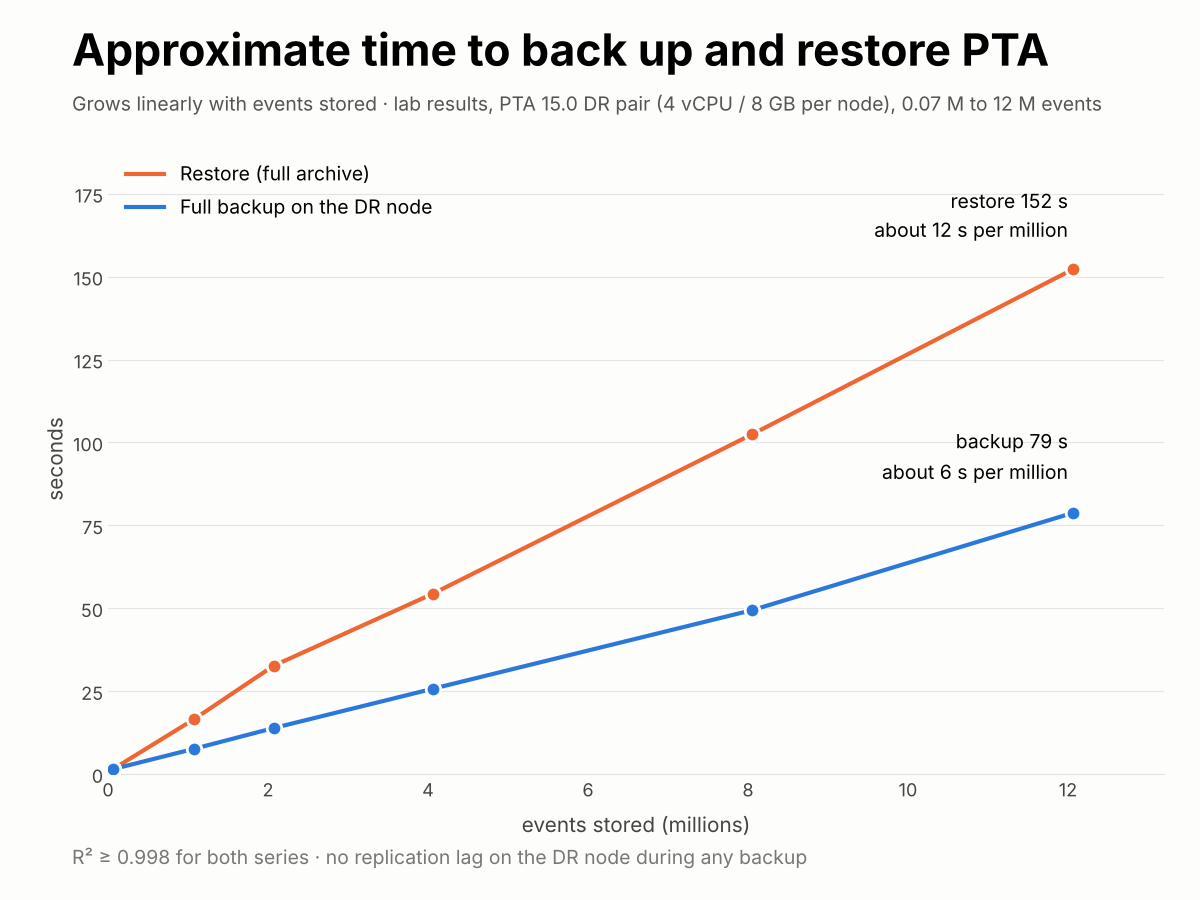
| Per million events | Value |
|---|---|
| Full backup on the DR node | about 6.4 s |
| Backup archive (gzip) | about 59 MB |
| Restore into a database | about 12.4 s |
No replication lag on the DR node during any backup. For 300 million events that points to about 18 GB and about 35 minutes per full backup. That is an extrapolation, so measure one backup on your own DR node.
Key snippet
The core of the backup is the connection. The certificate paths come from the database config, so the same lines work on PTA 15.x (ptadb.conf) and 14.x (mongod.conf):
PEM=$(awk '/^[[:space:]]*(certificateKeyFile|PEMKeyFile):/{gsub(/"/,"",$2); print $2; exit}' "$CONF")
CA=$(awk '/^[[:space:]]*CAFile:/{gsub(/"/,"",$2); print $2; exit}' "$CONF")

CONN=(--host=127.0.0.1 --port="$PORT" --readPreference=secondary
      --ssl --sslCAFile="$CA" --sslPEMKeyFile="$PEM"
      --tlsInsecure --authenticationMechanism=MONGODB-X509 --authenticationDatabase='$external')

mongodump "${CONN[@]}" --db="$DB" --gzip --archive="$out" "$@" 2>"$out.log"

# mongodump logs "done dumping diamond_db.<collection> (<n> documents)" per collection;
# tools 100.18 (PTA 14.2) put the name in backticks, 100.13 (PTA 15.0) don't
sed -nE "s/.*done dumping \`?$DB\.([^\` ]+)\`? \(([0-9]+) documents?\).*/count $name \1 \2/p" "$out.log" >> "$MAN.tmp"
--tlsInsecure only skips the hostname check. The database answers on 127.0.0.1 but its certificate names the node. The connection never leaves the box and the client still authenticates with its certificate.
Lessons
- Replication is not backup. Measure it once and nobody argues anymore: the delete was on the DR node in under 10 seconds.
- Don’t trust a success message, check the exit code.
mongorestoreprinted “0 document(s) failed to restore” on an archive that broke halfway. Only its exit code showed the failure. The restore now needs both. - A safety check that never fires is a liability. The first version’s version guard passed when both sides were unknown, and its count check passed with zero counts. Both now fail closed. The count check paid off on 14.2, where mongodump writes a different log format and the backup stopped itself instead of writing an empty manifest.
- Set the traps before the dangerous step. Stopping PTA takes about 40 seconds. A dropped SSH session in that window used to leave PTA down. And
nohuphides SIGHUP, so it can’t test that. - PTA does learn. Most detections are rules you define in PVWA, but
baselinesholds profiles PTA builds itself. A restore brings them back. - A rebuild is more than data. The new server needs a new CA certificate, and PVWA’s gateway account (
PTA_PAS_Gatewayin the Vault andpta_pas_gatewayin PTA’s database) has to be reset withpasConfiguration.sh. Otherwise PVWA gets 401. - Same hostname and IP make a rebuild boring. The Vault reconnected by itself on 14.2. With a new name, every integration needs re-pointing.
- Synthetic test data must look real. My first million events were clones, and 100,000 of them compressed to 1.6 MB. Varied users, hosts and IDs gave numbers I can publish.
- Windows line endings break shell scripts. One edit from Windows turned the backup script into
$'\r': command not found. The repo pins*.shto LF in.gitattributes. - Lab hygiene matters. Snapshots of Windows VMs taken minutes apart don’t match: PVWA rotated its own Vault password in between and could not log on after the revert. Suspend first, then snapshot all at once.